Zapier Overview
The Speech is Cheap Zapier app transcribes audio and video files in automated workflows. This page explains how to configure inputs, choose between files and URLs, and handle step execution.
Input file
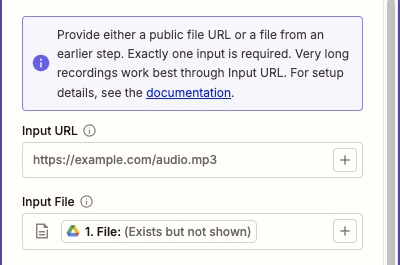
For triggers that output file objects, such as Google Drive or Dropbox, use Input File.
- In the Input File field, select the file object from the trigger step (such as Google Drive's File).
- Leave Input URL blank.
Google Drive and Dropbox folders do not need to be public when using Input File. Zapier passes Speech is Cheap an unlisted link to a temporary copy of the file.
Files passed through Input File can be up to 150 MB.
Input URL
Use Input URL when media is hosted on an external server without a Zapier file trigger, or when a recording exceeds 150 MB. Very long recordings (up to 24 hours) work best through Input URL.
- Enter a direct download URL that downloads the media file without a login.
- Leave Input File blank.
If you choose to use Input URL with cloud storage instead of Input File, the link must be publicly accessible:
- Dropbox: Click
[+]and select Direct Media Link. - Google Drive: Set the file or folder permissions to "Anyone with the link", type
https://drive.google.com/uc?export=download&id=, and append the file's ID from the trigger step.
Provide either Input File or Input URL, not both. Leaving both blank or filling both causes a configuration error.
Transcribe Audio inputs
The Transcribe Audio action supports these inputs:
- Language: Select one of 100 supported language codes to apply it to all segments, or leave blank to detect language automatically for each segment.
- Can Parse Speakers?: Identifies speakers by voice, adds speaker IDs to segments, and prefixes lines with labels like
Speaker A:in the transcript and subtitles. Add-ons are billed per minute; see pricing for rates. - Can Parse Words?: Adds word-level timestamps to segments.
- Can Label Audio?: Tags non-speech sounds like
[music]in the transcript and subtitles. Silence is omitted. - Include Timestamps in Transcript?: Adds a timestamp such as
[0:04]to the start of each line in the transcript. Without timestamps, the transcript uses paragraphs.
Hotwords and Prompt inputs are no longer supported because the Jobs API removed them in version 2.8.0.
Advanced options
Expand Advanced Options in Transcribe Audio to configure optional job settings:
- Split Channels?: In stereo recordings, treats each audio channel as its own speaker without speaker parsing. Like speaker parsing, this prefixes lines with labels like
Speaker A:. - Keep Transcription Private?: Hides the input URL and deletes the transcript from Speech is Cheap servers 12 hours after completion. The Zap still receives the complete output.
- Minimum Confidence Threshold (0.0 - 1.0): Filters out segments that fall below this confidence threshold (default
0.5). Applies to transcriptions and non-speech audio labels. - Segment Duration in Seconds (6 - 30): Sets segment slice duration in seconds (default
30). - Include JSON in Output?: Adds the raw JSON API response to the step output.
Halting behavior
Entering an invalid confidence threshold (outside 0.0 to 1.0) or segment duration (outside 6 to 30 seconds) fails action configuration before job submission.
After submission, the following failures and cancellations halt the Zap instead of failing it. Halting prevents Zapier Autoreplay from retrying the same transcription:
- Audio shorter than six seconds
- Audio longer than 24 hours
- Unsupported language codes
- Out-of-range confidence thresholds rejected during transcription
- Transcriptions canceled by the user
Other failures, such as network timeouts or transient API errors, remain errors so retries can occur.
Test steps
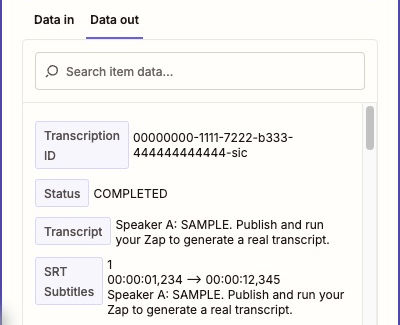
When you test a Transcribe Audio step in the Zap editor, the app returns a sample transcription without calling the API or billing your account.
The sample demonstrates the output format based on your configured options, including speaker labels, audio labels, and timestamps. Testing Find Transcription with an existing Transcription ID reads live status from the API. To run a real transcription through Transcribe Audio, publish and run the Zap.